
Home / Add-ons / Download er4u POS app
Android app · Not on Play Store · Official download
Download the er4u POS app for Android
Open this page on your Android phone and tap the button. On a computer, the file downloads to the computer; send the page link to your phone instead.

Install
How do you install the er4u POS app?
Because the app is not from the Play Store, Android asks you to allow it the first time. Follow the pictures; the marked button is the one to tap.
Swipe for the next step →
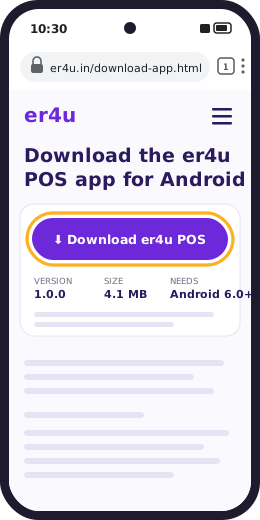
Step 1 of 8
Open this page on your phone
Open www.er4u.in/download-app.html in Chrome on your Android phone and tap Download er4u POS for Android.
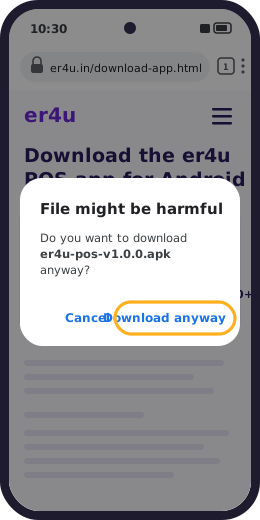
Step 2 of 8
Tap Download anyway
Chrome warns about every app downloaded outside the Play Store. This file comes from er4u.in, so tap Download anyway.
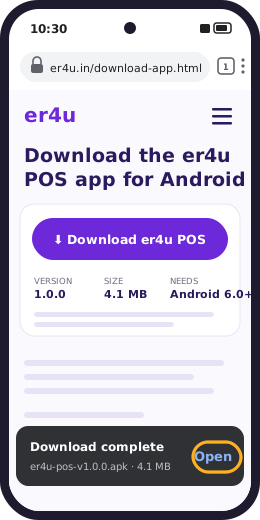
Step 3 of 8
Tap Open
When the download finishes, tap Open in the message at the bottom of the screen. The file is also in Chrome's Downloads.
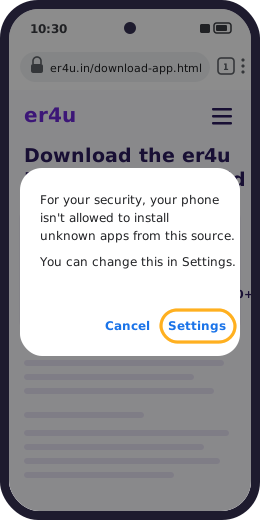
Step 4 of 8
Tap Settings
The first time, Android blocks apps from sources it doesn't know. Tap Settings.
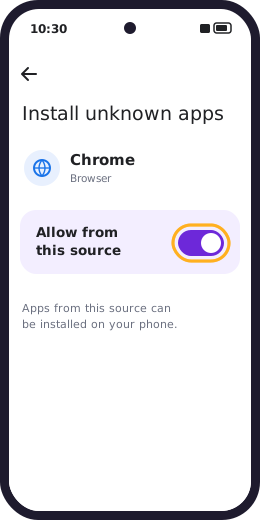
Step 5 of 8
Allow Chrome, then go back
Turn on Allow from this source for Chrome, then press Back.
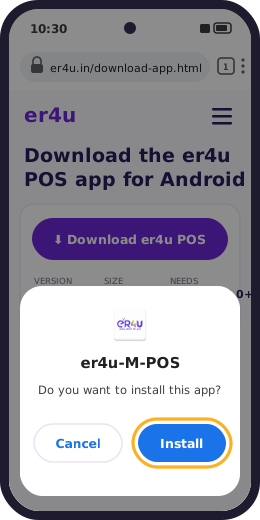
Step 6 of 8
Tap Install
Your phone lists the app as er4u-M-POS. Tap Install. If Google Play Protect offers to scan it, let it scan.
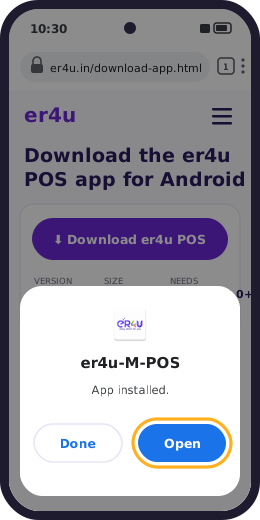
Step 7 of 8
Tap Open
When Android says App installed, tap Open. The er4u-M-POS icon is now on your home screen too.
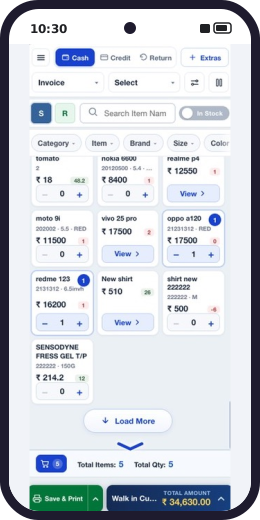
Step 8 of 8
Sign in and start billing
Sign in with your er4u login. Your items, prices and customers load from your er4u software, and you can bill straight away.
Pictures are illustrations. Wording and colours differ a little between phone brands and Android versions. Once the app is installed, you can turn Allow from this source off again for Chrome.
What it does
What can you do with the er4u POS app?
The app connects to your er4u software, so items, prices, stock and customers are the same on the phone and at the counter. Staff can bill from anywhere in the shop:
- Cash, credit and return bills, with items found by name, category, brand, size or colour, or scanned by barcode with the phone camera.
- Item discounts, split payments and coupon discounts on a bill.
- Hold a bill while the customer keeps shopping, then pick it up again.
- Credit (udhaar) bills and each customer's ledger.
- B2B GST invoices for business customers.
- Loyalty points and membership benefits for regular customers.
- Sales and stock reports on the phone.
- Printing on a Bluetooth receipt printer.
Each of these has a short training video in Hindi and English: watch the Mobile POS videos →
Plans
Which er4u plans include the app?
| Plan | er4u POS app |
|---|---|
| Enterprise, Enterprise Max, Enterprise Plus (online) | Included |
| Enterprise Off, Enterprise Pro, Enterprise Multi (offline) | Included |
| Startup, Premium, Startup Off, Premium Off | Add-on: ₹5,000 + GST, one-time |
Permissions
What does the app ask permission for, and why?
Android asks you before the app can use any of these. You can change them later in your phone's settings, under Apps → er4u POS → Permissions.
| Permission | Why the app needs it |
|---|---|
| Internet | Sends bills to your er4u account and loads your items, prices and customers. |
| Bluetooth | Finds and prints to your Bluetooth receipt printer. |
| Location | For delivery and field staff: records where they are while working. Older Android versions also ask for it to find Bluetooth printers. |
| Location while the app is closed | Only for delivery and field staff, so their location keeps updating during a delivery round. Counter staff can say no. |
| Run without battery optimisation | Keeps location updates going for delivery and field staff when the phone is idle. Counter staff can say no. |
| Camera | Scans item barcodes while billing, and takes item photos. |
| Photos and media | Picks item images from your phone's gallery. |
| Notifications | Shows alerts from the app. |
Safety
How do you know the app is genuine?
- Download only from this page at https://www.er4u.in. er4u does not publish this app on APK websites, and an APK forwarded on WhatsApp may have been changed.
- Updates must match our signature. Every er4u release is signed with the same er4u key. Android refuses to install an update signed with any other key over the app you have.
- For IT staff: check the file and its signing certificate against these SHA-256 fingerprints.
| File | er4u-pos-v1.0.0.apk |
|---|---|
| Package | com.bit.erp4billingpos.angular |
| File SHA-256 | d85e144937d5a7aed27cde1a15811b50f54b41d0b564dc4ac18f46487df585f6 |
| Signing certificate SHA-256 | 0B:03:49:53:C6:61:25:AE:2F:46:03:34:40:39:EB:AE:41:FD:7B:AB:96:76:A8:41:A5:A9:87:FE:30:79:2C:9D |
FAQ
Frequently asked questions
Is the er4u POS app on the Google Play Store?
No. er4u POS (the Easy Billing App) is not on the Play Store. Download it only from this page on www.er4u.in. Copies on APK websites or forwarded on WhatsApp are not from er4u and may have been changed.
Is the er4u POS app free?
The app is included in the Enterprise, Enterprise Max and Enterprise Plus online plans and the Enterprise Off, Enterprise Pro and Enterprise Multi offline plans. On Startup and Premium plans it is an add-on at ₹5,000 + GST, one-time.
Which phones does the er4u POS app work on?
Android phones and tablets running Android 6.0 or later. It is not available for iPhone.
Is it safe to install an app from outside the Play Store?
It is safe when the file comes from the developer's own website, as this one does. Android checks the app's signature, and every er4u update is signed with the same er4u key, so Android will only install updates that come from er4u. Download it only from www.er4u.in.
How do I update the er4u POS app?
Download the latest version from this page and install it over the app you already have. You do not need to uninstall first, and your login and settings stay.
Why does my phone say "App not installed"?
Usually because an older copy signed with a different key, such as a test build, is already on the phone. Uninstall it, then install the version from this page. If it still fails, call er4u support on +91-8047275564.
Can I print bills from the app?
Yes. The app prints bills on a Bluetooth receipt printer paired with the phone.
Related: All add-ons · Receipt printers and POS hardware · Billing features · Mobile POS training videos
Need help installing er4u POS?
Call er4u support on +91-8047275564. Not an er4u customer yet? Book a free demo and see the app bill, print and update stock live.
Book a free demo